

Your senior estimator walks into your office. The one who’s been with you for 15 years. The one who can price a complex job in his sleep.
He looks at the AI software on your screen and asks the question every structural steel fabricator hears sooner or later: “Are you trying to replace us?”
If you run a shop bidding commercial, industrial, or data center work, you’ve probably asked yourself the same thing. You’re turning down 20-40% of bid opportunities because your estimating team is maxed out, and you can’t hire experienced people fast enough. The structural backdrop helps explain why: Construction Dive’s analysis of the estimator talent gap cites AGC data showing one in four construction workers is over 55, with BLS projecting 41% of the current workforce could retire by 2031.
The honest answer, if you get this right, is no. You’re not replacing your best estimators. You’re giving them a faster way to do the work only they can do.
- The problem: Manual takeoff and data entry are eating 60-80% of your estimating time.
- The agitation: That time is coming straight out of pricing strategy, VE, and client conversations, the parts of the job that actually win work and protect margin.
- The solution: Train your team to use AI as a first-pass takeoff engine and keep humans in charge of review, risk, and pricing.
This article sits under The Ultimate Guide to Steel Estimating and is written for estimating leaders, COOs, and project managers at steel fabrication shops who want to train their teams to work with AI tools like SketchDeck without losing their best people.
SketchDeck.ai built SketchDeck, an AI-powered steel takeoff tool that completes structural steel takeoffs in minutes instead of hours. Companies like Motion Steel and King Steel have put SketchDeck in front of their teams. Not a single estimator was replaced. Instead, they’re completing 50-65% more bids with the same people and the same core workflows. If you’re still evaluating whether your process is ready, start with 5 Signs Your Steel Estimating Process Is Ready for an AI Transformation.
What Your Estimators Are Really Worried About
Before you talk training plans or features, you need to deal with what’s in your team’s heads.
They’re not just worried about software. They’re worried about identity. They’ve spent years building a reputation on accuracy, speed, and judgment. Now you’re telling them a computer can do the “hard part” in minutes.
In most mid-market shops (30-300 employees, $25-75M in revenue), estimators are already working 50-60 hour weeks, turning down good work because there’s no capacity left. When you introduce AI into that environment, it can feel like a threat instead of a relief unless you frame it properly.
Research published in Frontiers in Artificial Intelligence found that awareness of automation correlates with reduced organizational commitment and higher turnover intentions, even when the AI itself is performing well. Harvard Business Review’s analysis of organizational barriers to AI adoption reports that fear of replacement and entrenched workflows quietly derail AI initiatives even in companies with advanced tools.
Here’s what each group is actually thinking.
Senior Estimators (15+ Years):
- “I’ve been doing this longer than you’ve been in business.”
- “My experience can’t be replaced by software.”
- “What if it makes mistakes I have to fix?”
- “I’m too old to learn new technology.”
These are the people who hold your institutional knowledge, client history, and gut feel on risk. If they feel blindsided by AI, adoption dies before it starts.
Mid-Level Estimators (5-15 Years):
- “Will this make my skills obsolete?”
- “Do I have to become a tech person now?”
- “How will this change my daily work?”
- “What happens to my career path?”
Junior Estimators (Under 5 Years):
- “Will AI eliminate entry-level positions?”
- “How do I build expertise if AI does the basics?”
- “Should I even stay in this field?”
- “What new skills do I need to learn?”
If you ignore these worries, AI will feel like a threat no matter how good the tool is. When you name them out loud and show receipts on real projects, AI turns into a career accelerator instead. For a deeper dive into realistic expectations, share What AI Can and Cannot Do in Steel Estimating: Setting Realistic Expectations with your team.
Build Trust Before You Teach Tools
The steel shops that actually get value from AI don’t start with features or pricing. They start by earning trust, then teaching the tool. For change management context that goes beyond this article, Change Management for AI in Steel Estimating: How to Bring Your Team Along covers the full playbook.
Phase 1 (Week 1): Honest Conversation, Not a Software Announcement
This is a live meeting, not a memo.
What you say:
- “We’re adding AI to make your jobs easier, not to replace you.”
- “You still make all the important decisions. AI just handles the counting.”
- “Your experience becomes more valuable, not less.”
- “We’re going to test this together before we change anything.”
What you show:
- Real takeoff comparisons: manual vs. SketchDeck on one of your projects.
- Where AI matches your numbers and where humans still catch issues.
- A simple breakdown of time saved on routine tasks.
- How senior estimators at other shops use that freed-up time.
- How SketchDeck lets the same team complete more bids per month without adding headcount.
The goal of Week 1 is not “everyone logged in.” The goal is: “I understand why we’re doing this, and I’ve seen it work on drawings I recognize.”
Phase 2 (Week 2): Find Your Champions and Make Them Visible
Every team has a few people who lean in when something new appears. Those are your force multipliers.
Look for estimators who:
- Ask curious questions instead of shutting down.
- Already tinker with Excel templates or Tekla reports.
- Have informal influence on the floor.
- Complain about inefficient workflows (in a good way).
Give them:
- Early access to SketchDeck.
- Ownership of one or two pilot projects.
- Time in the next team meeting to show what they did.
- Public support from leadership.
The peer-reviewed study published in the Journal of Information Technology in Construction identifies effective change agents as one of seven key practices that enhance technology adoption in AEC firms. When a skeptical senior estimator sees a mid-level colleague they respect using AI to deliver the same numbers 5-10x faster, the conversation changes from “no way” to “show me how you did that.”
Phase 3 (Weeks 3-4): Parallel Processing, Not a Big-Bang Cutover
The fastest way to kill trust is to flip a switch overnight. The fastest way to build it is to run AI and your current process side by side.
How parallel processing works:
- Keep running manual takeoffs exactly as you do today.
- In parallel, run the same projects through SketchDeck.
- Review differences together as a team, not alone behind closed doors.
- Capture where AI nails it and where humans still add critical value.
If you want a short, visual explanation for training, the 2-Minute SketchDeck Demo is a good resource.
The mindset shift you want is simple: AI does the first draft. Your team does the final estimate.
Turn Skeptics Into Power Users
Once you’ve built trust, you’re ready for structured training. This is not generic software onboarding. It is estimating training with AI in the loop.
Week 1: Hands-On, Real Projects Only
Day 1-2: Show, Then Do
Morning, see it work:
- Pick a recent project everyone knows cold.
- Upload it into SketchDeck.
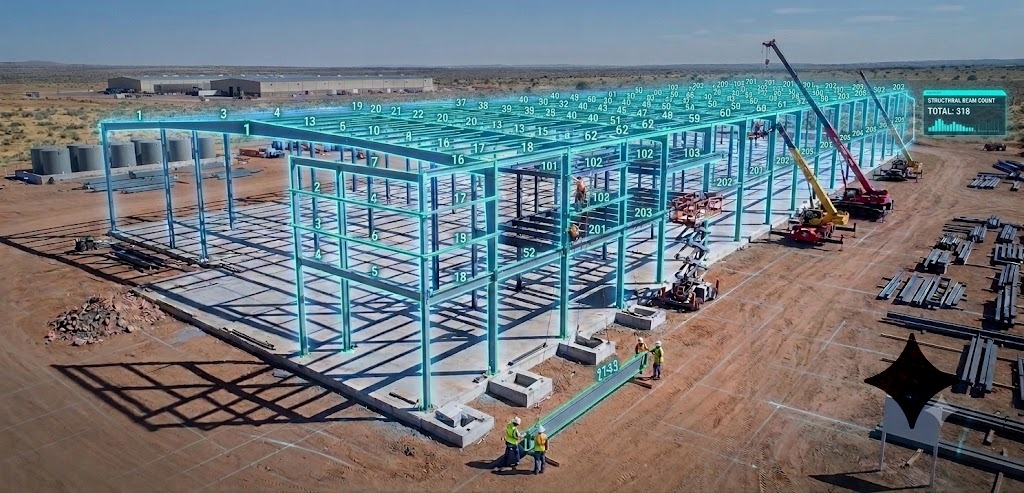
- Walk through how it detects beams, columns, and braces.
- Show the BOM and compare to your manual takeoff.
Afternoon, try it themselves:
- Each estimator uploads a simple project (small job, clean drawings).
- They walk through the detection and review flow with you beside them.
- You highlight wins: “You just did in 20 minutes what used to take half a day.”
No algorithm talk. No jargon. Just a clear link between clicks and time saved. If you need a technical explainer for your internal trainers, How AI Reads Structural Steel Drawings and Computer Vision in Construction cover the underlying technology.
Day 3-5: Build Confidence
- Start with straightforward jobs (clean structural sets).
- Move to moderate complexity: mixed details, some revisions.
- Keep a running list of issues and send them to the SketchDeck.ai support team for follow-up.
Make sure everyone knows how to:
- Upload drawings properly.
- Review and edit detected members.
- Export into Tekla, Excel, or your estimating templates.
Week 2: Plug AI Into Your Existing Workflow
This is where SketchDeck stops being “extra” and starts being “the way we do takeoff.” For a broader view of how AI fits without disrupting current systems, How AI Integration Transforms Existing Steel Estimating Workflows Without Disrupting Your Team is the companion read.
Train specifically on:
Where AI fits in the bid process. RFQ comes in → drawings into SketchDeck → review → export to your usual tools.
When to use AI vs. manual. Standard structural jobs: AI by default. Truly messy, low-res, or edge-case misc metals: manual or hybrid.
How exports feed what you already use. Tekla/PowerFab/Strumis imports, custom Excel estimating templates. For more on how SketchDeck handles weights, connections, and labor codes automatically, see Did You Know: How SketchDeck Automates Weights, Connections, and Labor Codes.
How quality control works now. Review flagged items first, spot-check grids and high-risk areas, sanity-check tonnage vs similar jobs.
Use realistic scenarios:
- Tight-deadline bids where AI turns “no bid” into “we can submit.”
- Complex connection jobs where seniors focus on joints while AI handles the bulk steel.
- Revision cycles where Revision Management updates BOMs instead of restarting takeoff from scratch.
By the end of Week 2, the bar is simple: every estimator has used AI on multiple real jobs and knows where it plugs into their normal day.
Weeks 3-4: Advanced Skills for People Who Want Them
Once the basics are comfortable, a subset of your team will want more.
Advanced topics:
- Customizing tags and fields in exports to match your BOM format.
- Handling non-standard drawings or older scans.
- Batch processing multiple projects in parallel.
- Creating playbooks for common project types (schools, warehouses, tilt-up, etc.).
Optimization topics:
- Which jobs benefit most from AI (by tonnage, complexity, drawing quality).
- How to combine AI and manual for oddball jobs.
- How to use freed-up time: more bids, deeper VE, tighter risk reviews.
These power users become your internal trainers and process-improvement people. For a higher-level strategy piece to anchor this, Why the Steel Industry Is Turning to AI: The Complete Guide to Construction Automation is a strong companion.
Building a more sustainable estimating function? How Steel Estimators Handle Complex Projects Without Burning Out covers five workflow strategies that cut takeoff time by 80% and make the role less brutal.
Handling the Three Biggest Objections
You’ll hear the same pushback in almost every shop. Plan for it.
1. “The AI Makes Mistakes”
Response:
- “Yes, and so do humans. The point is not perfection, it’s getting to a solid draft faster.”
- Show side-by-side error rates from your parallel runs.
- Walk through how to correct detections in seconds.
- Repeat: AI does the first pass. Estimators still own the final numbers.
Training focus:
- How to review flagged or low-confidence items.
- Quick ways to correct sizes, lengths, or member types.
- When to add manual checks for safety (complex connections, unusual details).
For more on what AI can and cannot do reliably, see The Precision Gap: Why “Automated” Takeoff Software Is Failing Steel Estimators.
2. “It’s Too Complicated”
Response:
- “If you can run a takeoff in Excel or Tekla, you can use this.”
- Start with a 5-minute click-by-click checklist for the basic workflow.
- Pair hesitant estimators with champions for the first few projects.
- Record simple screen-share videos for later reference.
Training focus:
- Short process cards: “1. Upload → 2. Review flags → 3. Spot-check → 4. Export.”
- Small early wins: “You just saved an hour on that job.”
- One-on-one support for your most skeptical seniors.
3. “My Experience Doesn’t Matter Anymore”
Response:
- “Your experience is what turns a takeoff into a winning bid. AI just gets you to the starting line faster.”
- Show senior estimators how their time shifts: less counting, more pricing and risk.
- Involve them in go/no-go bid decisions and complex VE discussions.
- Ask them to lead QA on early AI-driven jobs.
Training focus:
- Strategic estimating skills (risk, VE, client strategy).
- Use cases where human judgment clearly beats automation.
- Coaching juniors on why decisions are made, not just what the numbers are.
How Roles Actually Change With AI
The shops that win with AI are the ones that upgrade what each role does all day.
Senior Estimators: From Counters to Advisors
Before: most of the week on takeoffs and data entry. Little time left for strategy, VE, or mentoring.
After:
- Quick review of AI takeoffs instead of doing them from scratch.
- Deeper work on pricing, risk, and scope clarity.
- More time in client calls and pre-construction conversations.
- Structured time mentoring mid-level and junior estimators.
Senior estimators at SketchDeck customers often move from spending most of their week on manual takeoffs to focusing on bid strategy, risk, and mentoring, which is exactly where their experience creates the most value. The SketchDeck product page and customer stories index show this pattern across multiple shops.
Mid-Level Estimators: From Generalists to Specialists
New responsibilities:
- Owning complex project types (industrial, healthcare, multi-building sites).
- Leading VE proposals and what-if scenarios.
- Coordinating with detailing, production, and PM.
- Driving continuous improvement in takeoff and estimating workflows.
Growth path: a clear route into senior roles based on project complexity, not years counting beams.
Junior Estimators: From Tedium to Real Learning
Old path: years of manual counting and data entry, with slow exposure to complex jobs.
AI-enabled path:
- Immediate exposure to real projects with AI doing the first pass.
- Learning by reviewing and correcting, not just typing.
- Faster understanding of how quantities connect to pricing and risk.
- Earlier involvement in client-facing work with senior support.
For junior estimators, SketchDeck removes years of low-value manual work and gives them earlier exposure to real projects, which accelerates their path to becoming fully independent estimators.
Make Learning Ongoing, Not a One-Time Event
AI will keep evolving. Your training should too. For more on how the underlying system improves with use, see Machine Learning in Construction: How SketchDeck Gets Smarter Over Time.
Monthly Estimator Lab Sessions
One hour per month:
- One person shows a new trick or workflow.
- Review any unusual jobs from the last month.
- Capture and standardize new best practices.
Topics can include new SketchDeck features, better export templates for Tekla/Strumis/Excel, time-saving shortcuts, and “we caught this issue because of AI” case studies.
Peer Learning and Support
- Pair newer users with power users for the first 4-6 weeks.
- Rotate pairs so knowledge spreads, not just stays with one guru.
- Keep a simple internal FAQ doc: “Our SketchDeck playbook.”
Use Vendor Support Hard
With SketchDeck, you are not on your own. SketchDeck.ai provides live onboarding sessions, email and chat support that responds in hours, video walkthroughs and documentation, and help tuning exports to your exact workflow.
How to Know Your Training Is Working
Do not just feel it. Measure it.
In the first month:
- How many estimators have logged into SketchDeck?
- How many real projects have run through AI?
- How long is a typical takeoff with and without AI?
- Are people asking more “how” questions or “why are we doing this” questions?
By month 3:
- What percentage of bids use AI for the first pass?
- How many bids per estimator per week vs. your old baseline?
- Are error rates (missed members, wrong sizes) going up, down, or flat?
- What does your team say when you ask, “Could you go back to the old way?”
Shops that lean into training and parallel processing routinely see:
- 50-80% reduction in takeoff time.
- 40-60% increase in bid capacity with the same headcount.
- More consistent, repeatable estimating processes.
Customer stories that show this in practice:
- How SSE Reduced Estimating Times by Up to 80% with SketchDeck.
- How MSE Reduced Their Time Spent on Beam Takeoffs by 95%.
- Faster Bids: How Maccabee Industries Transformed Their Takeoff Process in 4 Months.
- MotionSteel Doubles Capacity Without Compromising Their Award Rate.
- King Steel Cuts Their Estimation Time in Half for Complex Projects.
Common Training Mistakes to Avoid
You do not have to learn these the hard way:
- Moving too fast and forcing AI-only before your team trusts it.
- Ignoring senior estimators and betting everything on younger, tech-comfortable staff.
- Using one-size-fits-all training for juniors and seniors.
- Running one kickoff session and then going silent.
- Failing to celebrate when someone uses AI to save hours or win a tight bid.
Fixes are simple: phased rollout, tailored training, ongoing support, and visible recognition when someone uses AI well.
Timeline: From Fear to “We’re Never Going Back”
Here is what a realistic rollout looks like in a steel shop:
- Week 1. Honest conversation, first live demo on your drawings, champions identified.
- Weeks 2-3. Hands-on learning, simple projects, parallel processing on a subset of bids.
- Weeks 4-6. AI becomes default for standard work. Manual used for edge cases.
- Month 2-3. Estimators start designing their own best practices. Productivity gains are obvious.
- Month 4-6. Roles evolve. Seniors become more strategic, mid-levels specialize, juniors learn faster.
- Beyond 6 months. AI is just “how we do estimating here.”
The Bottom Line
Training your steel estimating team to work with AI is a business decision, not just a software rollout. You are trying to increase bidding capacity by 80% and grow revenue without burning out the estimators you already have.
Your estimators will not be replaced by AI. The real risk is that shops who train their people to use it will outbid the shops who don’t.
The fabricators winning right now aren’t the ones shouting “AI” the loudest. They’re the ones quietly training their teams, running smart pilots, and turning saved hours into more bids, better pricing, and stronger margins.
Your team already has decades of experience. SketchDeck amplifies that experience. When you train them well, you don’t just get faster takeoffs. You get a smarter, more strategic estimating operation.
That senior estimator who walked into your office worried about his job? In six months, he’ll be the one saying, “I’m not going back to highlighters and manual counts.”
Want to See What This Looks Like on Your Drawings?
If you want to test this playbook on real jobs, book a short SketchDeck pilot. Bring three to five live projects, your estimating team, and a stopwatch.
Related reading
- The Ultimate Guide to Steel Estimating: Best Practices for Fabrication Success
- Change Management for AI in Steel Estimating: How to Bring Your Team Along
- What AI Can and Cannot Do in Steel Estimating: Setting Realistic Expectations
- How AI Integration Transforms Existing Steel Estimating Workflows Without Disrupting Your Team
- How Steel Estimators Handle Complex Projects Without Burning Out