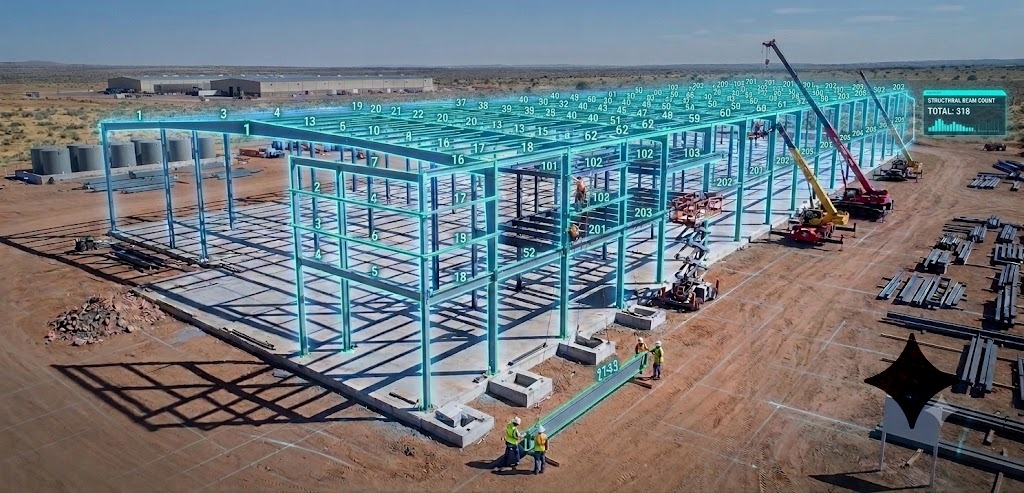


Computer vision can take structural drawings that used to demand a full day of manual takeoff and turn them into a verified bill of materials in about an hour when paired with an experienced estimator. This article explains how that works in plain construction language, so your team knows when to trust it, when to double‑check it, and how it fits into your overall steel estimating workflow.
What Is Computer Vision in Construction?
Computer vision is a branch of AI that lets software “see” and interpret visual information in images, PDFs, and videos. In construction, that means reading 2D plans, elevations, and schedules, then turning linework, symbols, and tiny labels into structured data like lengths, counts, and section sizes.
This is different from optical character recognition (OCR). OCR focuses on text only and can reach 98–99% accuracy on clean printed text at 300 DPI or higher. On construction drawings, OCR will happily read “W12x26” but does not know which line is the actual beam, how long it is, or how it relates to a grid line or elevation.
Researchers looking at AI for construction drawings highlight this gap clearly. In recent benchmarks, AI systems achieved about 91% accuracy on text labels in plans, but only 34–39% accuracy when recognizing basic architectural symbols like doors and windows. That 50‑point gap is the difference between reading drawings and actually understanding them.
For steel fabricators, this distinction matters. Manual estimators do more than read section tags; they interpret context, assumptions, “TYP” notes, and inconsistencies across sheets to protect margin. Computer vision has to be trained on thousands of real drawings before it can start to approximate that behavior.
For a deeper overview of how estimators traditionally read drawings and build material lists, see The Ultimate Guide to Steel Estimating: Best Practices for Fabrication Success on the SketchDeck.ai blog. For a general introduction to computer vision fundamentals, Stanford’s CS231n notes offer a clear technical background.
Why Construction Drawings Are Hard for AI
Seasoned estimators already know that no two drawing sets look alike. Research on engineering and construction documentation backs this up: drawing standards vary in line weights, layering, dimension styles, fonts, title blocks, and symbol libraries across firms and regions. Even within one project, structural, architectural, and MEP sheets can follow different conventions.
Academic reviews of computer vision in construction describe this as a domain mismatch problem. Most base models are pre‑trained on natural photos (people, cars, animals), not technical CAD linework and schematic symbols. When you apply those models to PDFs of structural plans:
- Linework is thin and tightly packed.
- Symbols overlap with text and hatch patterns.
- Notations like “TYP,” “SIM,” and revision clouds add noise.
- Scale and orientation change across pages.
A 2026 benchmark of AI on building plans found that symbol detection accuracy dropped to around 34–39% in dense or cluttered drawings, even though text recognition stayed above 90%. That matches what estimators see every day: the more markups, alternates, and addenda, the harder it is for both humans and AI to keep everything straight.
Training‑data research shows why this matters. Models only generalize when the training distribution matches the real‑world data; small or unrepresentative datasets lead to overfitting and poor performance on new projects. For steel takeoff, that means training on thousands of structural sets from different engineers, vintages, and project types, not just synthetic examples.
For a broader view of where computer vision fits into construction workflows beyond estimating, the review Computer vision applications in construction: Current state, opportunities and challenges in Automation in Construction is a useful reference.
How Computer Vision Reads Your Construction Drawings
From an estimator’s perspective, the key question is simple: “What actually happens after I upload a 150‑page PDF?” The underlying process is complex, but it follows a logical pipeline you can understand and evaluate.
Step 1: Ingesting and Classifying the Drawing Set
The first step is file preparation. Technical guides for blueprint OCR and document analysis describe a similar workflow across systems.
- Convert PDFs or scans into images at a consistent resolution, usually 300–600 DPI to capture fine steel linework and small fonts.
- Normalize orientation (fix rotated sheets), clean noise, improve contrast, and deskew warped scans so lines are straight enough to measure.
- Use convolutional neural networks (CNNs) to classify each sheet as a plan, elevation, section, schedule, or detail based on visual patterns.
Research on content‑based classification of construction drawings shows these CNN classifiers can reliably separate plans, elevations, and schedules once trained on hundreds or thousands of labeled sheets. That matters, because you don’t want the system counting architectural hatching as structural steel or misreading a general note page as a framing plan.
Readers who want a visual explanation of CNNs can explore Stanford’s CS231n and LearnOpenCV’s CNN guide.
Step 2: Detecting Steel Members and Key Objects
Once sheets are organized, object detection models scan each page for geometry and symbols. In general computer vision benchmarks, models like YOLO and Faster R‑CNN reach strong performance:
- Studies comparing YOLO and Faster R‑CNN report precision around 78–81% and robust detection across noisy images.
- Construction‑focused detection work has achieved mean average precision (mAP) around 90% for objects on construction sites, such as equipment and materials.
These models work by sliding learned filters over the image. Early CNN layers detect edges and corners; later layers capture more complex shapes like wide‑flange profiles or grid bubbles. Feature Pyramid Networks (FPNs) stack these layers so the system can detect both long beams and small section tags on the same sheet by building multi‑scale feature maps.
For structural steel takeoff, object detection typically focuses on:
- Linear elements that match beam and brace geometry.
- Column footprints and shapes.
- Detail callouts and section markers.
- Connection symbols and tags where possible.
For a high-level explanation of how detection architectures differ, see this overview of R-CNN, Fast R-CNN, Faster R-CNN, and YOLO.
Step 3: Reading Text and Linking It to Geometry
OCR engines have matured to the point where 98–99% character accuracy is achievable on clean, printed text at 300 DPI or above. In construction documents, this allows accurate reading of:
- Section designations (e.g., W12x26, HSS6x6x3/8).
- Piece marks and callouts.
- Scale notes and grid labels.
The hard part is associating that text with the correct linework. Technical guides for blueprint OCR describe several challenges.
- Labels can be equidistant between two views.
- Views can overlap or be nested.
- Text may be rotated or partially obscured.
Systems handle this by using spatial heuristics and learned patterns: they look at the distance between a tag and candidate elements, follow leader lines, and respect view boundaries. They also detect the drawing scale from the title block or graphic scale bar and convert pixel distances into feet or millimeters.
Well‑designed construction‑drawing AI pipelines follow a pattern similar to the one described in commercial and research systems.
- Data intake: Fix orientation, detect scales, and separate relevant sheets.
- Extraction and recognition: Use computer vision to find geometry and OCR to read labels.
- Cross‑checking with specs: Compare extracted members against schedules or notes to catch mismatches.
- Maker–checker validation: Flag low‑confidence items for human review.
This is close to how SketchDeck works under the hood: detect beams, columns, and braces; read their labels; and assemble that information into a structured list that an estimator recognizes as a takeoff.
For readers evaluating OCR or drawing-reading solutions more broadly, MobiDev’s guide on OCR for engineering drawings covers these challenges in more technical depth.
Step 4: Cross‑Referencing Views and Schedules
On a real project, no single sheet tells the full story. Research on BIM and computer vision for construction progress highlights how powerful cross‑sheet reasoning can be: linking objects between models, images, and schedules reduces errors and improves tracking.
For 2D steel drawings, cross‑referencing usually means:
- Matching piece marks across plans, elevations, and schedules.
- Ensuring schedule quantities align with counted instances on plans.
- Reconciling conflicting sizes or notes between detail and plan sheets.
Systems that incorporate these checks behave more like a meticulous estimator with perfect memory. They aggregate appearances of each member across the set and flag discrepancies instead of silently averaging them out.
Step 5: Generating a Bill of Materials
Once geometry and text are linked, the system builds a bill of materials (BOM). In manufacturing and construction, automated BOM generation has been shown to:
- Cut BOM errors by 80–90%.
- Reduce BOM processing time from days to hours.
- Improve material demand forecasts by 15–20%.
For a structural steel fabricator, the output typically includes:
- Section type and size.
- Length or quantity.
- Location or grid reference.
- Calculated weight using standard section properties from sources like the AISC Code of Standard Practice and CISC Code of Standard Practice for Structural Steel.
This is where the “pixels to BOM” promise becomes concrete. Instead of spending 4–8 hours on manual takeoff for a mid‑size structural package, shops using AI‑assisted takeoff tools report first‑pass BOMs in 10–20 minutes, followed by focused verification.
To revisit how you currently build BOMs by hand and where automation can slot in, see the BOM and takeoff sections in The Ultimate Guide to Steel Estimating.
Accuracy, Limits, and Why Verification Still Matters
Computer vision performance is usually reported using technical metrics like Intersection over Union (IoU) and mean average precision (mAP). In practice, estimators care more about:
- Piece count accuracy.
- Size accuracy.
- Length and area accuracy.
- Tonnage accuracy.
General object detection research on standard datasets shows that even top models rarely exceed 60–65% mAP under strict evaluation conditions. Domain‑specific systems can do better when trained on a narrow problem: construction object detection studies have reached around 90% mAP for site objects, and text extraction on drawings can hit 90%+ for labels.
But the symbol gap remains. AEC benchmarks report only 34–39% accuracy on common symbols in dense architectural plans. That means any vendor claiming “99% accuracy on everything” without breaking down metrics (pieces vs. sizes vs. connections) deserves extra scrutiny.
From a risk perspective, this matters because construction cost research shows:
- About 85% of projects suffer cost overruns.
- Cost overrun ranges of 15–28% are common.
- Around 32% of cost overruns can be traced back to estimating errors.
Your own estimating guide makes the same point in more direct terms: a 5–10% miss on quantities or unit rates can wipe out a 10–15% target margin on a job. Even if a computer vision system gets you 95% of the way there, you still need an efficient verification workflow to protect that margin.
Best practices from AI quality‑control research recommend:
- Reviewing low‑confidence detections and conflicts first.
- Running sanity checks on tonnage per square foot or per floor.
- Logging corrections so models and workflows improve over time.
SketchDeck is built around that philosophy. It aims to detect steel on most drawings with 95–99% accuracy, but SketchDeck.ai’s own messaging stresses human oversight, a learning curve, and pilot projects on real drawings rather than push‑button automation.
For a deeper dive on where AI stops and human judgment starts, see What AI Can and Cannot Do in Steel Estimating: Setting Realistic Expectations. For readers interested in the broader benefits of BIM for quantity takeoff and coordination, this BIM overview for contractors is a helpful reference.
When Computer Vision Adds the Most Value
Research on digital takeoff and BOM automation lines up with what fabricators report in practice: the biggest gains come in standard, well‑documented projects.
Studies of digital takeoff tools show time savings on the order of 80% compared to manual methods for quantity takeoff across trades. BOM automation case studies in construction and manufacturing report 80–90% error reduction and 30% faster project timelines when BOM creation is automated. Your own customers see a similar pattern with steel:
- Manual takeoff for a typical mid‑size steel package often takes 4–8 hours.
- With SketchDeck, shops report reducing estimating time by up to 80%, turning a two‑day manual process into a few‑minute automated run plus verification.
The sweet spot for computer vision–based takeoff is usually:
- New construction with clean CAD or Revit structural sets.
- Clear, consistent schedules and section tags.
- Repetitive framing where missing a member is unlikely once patterns are learned.
Projects that remain high‑oversight include:
- Renovations and retrofits with complex existing conditions.
- Heavy misc metals and custom fabrication where AI has little training data.
- Low‑resolution scans and heavily marked‑up drawings.
This maps directly to the estimating strategies in your pillar guide. Use AI takeoff to handle the bulk of standard framing quickly, then allocate estimator time where judgment and experience matter most, connection complexity, special conditions, and pricing strategy.
This maps directly to the estimating strategies in The Ultimate Guide to Steel Estimating: use AI takeoff to handle the bulk of standard framing quickly, then allocate estimator time where judgment and experience matter most. For readers who want to understand how AI adoption is playing out across the metal industry more broadly, this overview of AI and modernization in the steel industry provides useful context.
How to Evaluate Computer Vision Takeoff Systems
Because computer vision sits so close to your risk and margin, evaluation should go deeper than a polished demo. Research on AI verification and BOM automation, plus your own messaging guide, point to a few practical checkpoints.
Questions to cover in demos:
-
Accuracy:
-
Training data and domain focus:
- Was the model trained specifically on structural steel drawings, or is it a general OCR/computer vision engine?
- How does the system adapt to our title blocks, line types, and symbol conventions?
-
Workflow and verification:
-
Integration and export:
SketchDeck.ai’s Computer Vision Evaluation Checklist for Fabricators turns these ideas into a structured questionnaire and ROI worksheet.
SketchDeck.ai’s Computer Vision Evaluation Checklist for Fabricators turns these ideas into a structured questionnaire and ROI worksheet. For readers who want to understand AI verification more broadly, this overview of automated data quality checks is a good companion resource.
See Computer Vision Run on Your Drawings
If you are exploring computer vision for steel takeoff, the most useful test is not a curated demo, it is running the system on your own projects.
SketchDeck uses computer vision to:
- Detect beams, columns, and braces on your 2D structural drawings.
- Read section sizes and piece marks using high‑accuracy OCR.
- Assemble a structured BOM you can export into Excel, Tekla, Strumis, and other tools you already use.
During a pilot, the SketchDeck.ai team will:
- Process 3–5 of your actual projects.
- Share raw results and highlight low‑confidence items.
- Walk your estimators through a practical verification workflow.
- Help you compare time and accuracy against your current process.
You can request a pilot or demo here:
See Computer Vision in Action on Your Drawings →
For context on how this fits into a complete estimating operation, many readers next move on to The Ultimate Guide to Steel Estimating: Best Practices for Fabrication Success and What AI Can and Cannot Do in Steel Estimating: Setting Realistic Expectations.