

Spend hours on manual takeoffs
- Limited time for more bids stops you from winning more work.
- Manual counting steel is time-consuming.
- Missing steel on estimates can be a costly mistake.
- Inconsistent workflows leave room for human error.
AI steel takeoff software
We help structural steel estimating teams save time, reduce errors and bid more work by automating manual, repetitive takeoffs. SketchDeck is AI-powered, cloud-based takeoff software built for steel estimators.




















“We are pen and paper people... We’re literally going from 1980 to 2025. That’s a 50-year technology jump.”
The problem
You're losing time you could be spending on more bids.
You're swamped with bids and often have to sacrifice accuracy for speed.
Your estimators don't always have time to dig into the details.
The solution
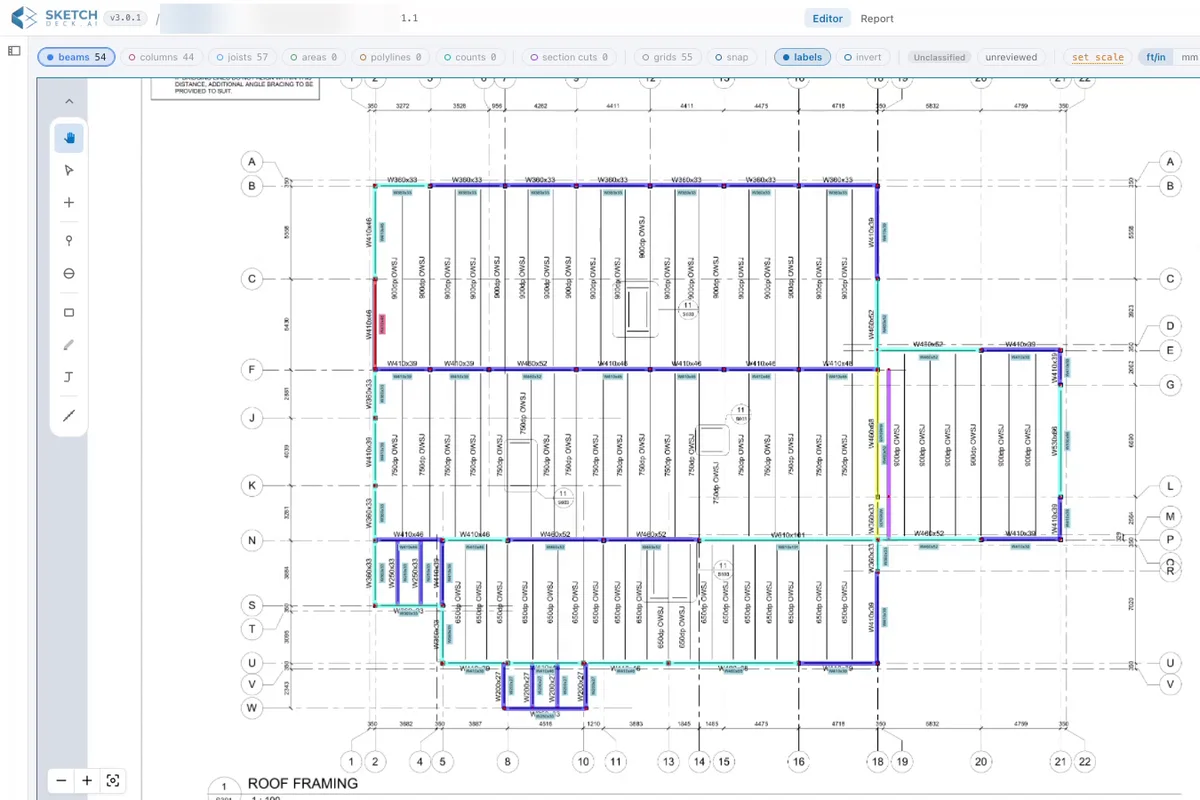
See SketchDeck run the takeoff on your own drawings.
Book a demo
How it works
Every step happens in SketchDeck, and your estimators check and approve each one.
01Upload the drawing set
Drop in the full PDF set, including jobs with hundreds of sheets. SketchDeck sorts the sheets, labels each one and reads its scale, so your estimators start on the takeoff instead of the setup.
Sheets
Scale read on every sheet
02Detect and measure every member
Beams, columns, braces and joists are found, sized and measured. SketchDeck reads the labels for shape, size, length, stud counts, camber and piece marks, and calculates the weights. Anything unclear is flagged for your review, not guessed.
03Finish the takeoff in one place
Count anything on the drawing, mark up areas and polylines, follow a callout straight to its section, and add connection material, all without leaving SketchDeck. Quantities update as you go.
04Connections and labor codes
SketchDeck analyzes every connection: framing conditions, moments, copes and holes. Each beam end gets a framing code, beam to beam, beam to column flange, skewed or HSS, which you map to your own labor codes and man-hours.
05Revision management
Load the revised set and SketchDeck lines up the sheets, reads them again and shows every member added, changed or deducted, with the weight difference. Your markups carry over to the new version.
06Export to your system
Send the bill of materials to Tekla PowerFab, STRUMIS, E.J.E., FabTrol, Excel or your own BOM template, with a marked-up PDF as the audit trail. We map the export to your import file before you start, and Bluebeam stays for markup.
Bill of materialsCapital.pdf
Export
 PowerFab

 Excel
ExcelBring a drawing set. We run the takeoff live on the call.
Book a demoWho it's for
Structural steel fabricators and erectors across North America, from the estimator doing the takeoff to the owner signing off on the bid.
Estimators
Detection handles the counting, so your time goes into the details that win the job. You review, edit and approve every member, and the estimate stays yours.
“A project that used to take me a day and a half to get done manually, I got it done in about two hours with [SketchDeck].”
Chief estimators and estimating managers
See where every bid stands, assign the work and set who can see and change what. Your shop's method lives in the system, not in one person's binder.
“What would have taken me four to five days as a manual takeoff, with [SketchDeck], I’m able to complete the takeoff in two days.”
Owners and executives
Compare SketchDeck with a new hire, not a seat price. Hiring and training an estimator takes months; teams are productive on SketchDeck in two to four weeks.
“[SketchDeck] accelerates our entire workflow. We quickly get beam counts, column counts, and everything we need.”
Erectors
Beams, columns, joists, bracing and studs counted from the drawings, so your crew and crane planning starts from real quantities.
“For a large 13,000 ton project, I could get all my floor plans done with [SketchDeck] in a single day.”
Where SketchDeck fits best
Not our focus today
See how SketchDeck fits your team.
Book a demoWhy estimators trust it
Unclear or unlabeled items are flagged for your review. SketchDeck doesn't guess, and it doesn't hide what it missed.
Click any line in the bill of materials and see its highlight on the drawing, piece by piece.
Computer-vision models trained on engineering drawings, not a general chatbot, built by a team led by a structural engineer.
Runs in the browser on standard office computers. No detailing platform needed, and security documents are available on request.
“We thought this was too good to be true, so we checked everything. If the drawing has a hundred beams on it, there’s probably less than five that I’m tweaking, a minute or two each.”
Matt ChanceEstimating, NAFCOCompared with the usual way
| Task | By hand | PDF markup tools | SketchDeck |
|---|---|---|---|
| Find and count members | Count every piece yourself | Click each piece to count it | Detected and counted for you |
| Sizes, lengths and weights | Read and calculate by hand | Measure tools, typed-in sizes | Read from the labels, weights calculated |
| Connections and labor codes | By hand | Not covered | Framing codes mapped to your labor codes |
| Revised drawing sets | Start over | An overlay shows what moved on the page | Shows which members changed, by how much |
| Into your fabrication system | Retype it | Export the markups | Exported in your system's format |
The fair test: run the same drawing set through each one and time the cleanup, not the demo.
Run the fair test on your next bid.
Book a demoPDF drawing sets for commercial and industrial structural steel, drawn to North American standards: data centers, warehouses, hospitals, hotels and similar jobs. Scanned PDFs work too. Misc metals, residential mixed-material work and renovations aren’t our focus today.
Beams, columns, braces and joists, with shape, size, length, stud counts, camber and piece marks read from the labels, and weights calculated. It reads graphical and tabular column schedules and tabular beam schedules, and analyzes connections: framing conditions, moments, copes and holes.
Anything unclear or unlabeled is flagged for your review instead of guessed, and every line in the bill of materials traces back to its highlight on the sheet. Your estimators review, edit and approve every member before anything is exported.
Yes. SketchDeck exports to Tekla PowerFab, STRUMIS, E.J.E., FabTrol, Excel and your own BOM template, plus a marked-up PDF. We map the export to your import file before you start. Bluebeam stays for markup.
Software. Your team runs the takeoff in SketchDeck. No drawings are sent out and there is no turnaround queue.
No. It’s built to speed up estimators, not replace them. SketchDeck handles the counting; your team handles the judgment, the strategy and the pricing. Shops use it to bid more work with the team they have.
Most teams are productive in two to four weeks, with onboarding from our customer success team. In-app support and a help center with articles and videos are there from day one.
No. SketchDeck runs in the browser on standard office computers, and you don’t need a detailing platform.
In Beta features are ones customers can try now while we finish them: column automation, 3D modeling, page stitching and parametric connection material. Ask about them on your demo.