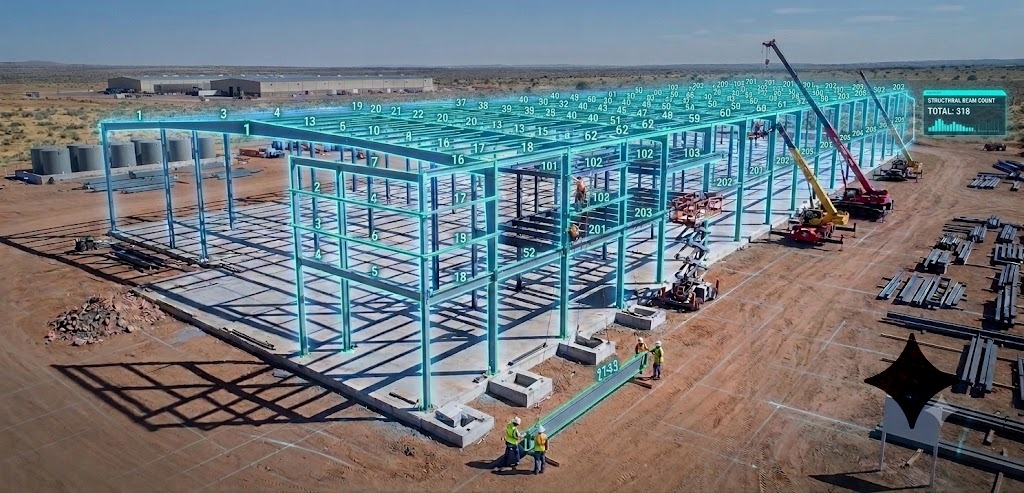


AI can slot into your existing steel estimating workflow as a fast, accurate takeoff “engine” without forcing you to abandon Tekla, Excel, Strumis, or the review habits your team already trusts. The key is treating AI as another tool in your estimating bench, not a replacement for your processes or your people.
How AI Integration Transforms Existing Steel Estimating Workflows Without Disrupting Your Team
Steel estimators face a tough decision. Stick with familiar manual processes that work but take hours, or risk disrupting everything with new technology that might not integrate with existing tools. The fear is real: what if AI does not work with Tekla, Strumis, or your custom Excel templates; what if it disrupts years of refined workflows; what if the team resists the change.
Across construction, digital takeoff and automation have already cut quantity takeoff time by roughly 80% compared to manual methods, as guides from Buildxact and other construction tools document. In structural steel, fabricators using AI‑assisted takeoff and integrated estimating workflows report 50–80% reductions in takeoff time and substantial gains in bid capacity. They are not replacing their systems; they are enhancing them.
For a good high-level overview of computer vision in construction, see the Automation in Construction review on computer vision applications.
This article explains how AI integrates with your current steel estimating workflows, what stays the same, what improves, and how to implement it without chaos.
For a complete walkthrough of manual steel estimating, including takeoff, labor, and pricing, see The Ultimate Guide to Steel Estimating: Best Practices for Fabrication Success.
The Integration Reality: What Actually Happens When You Add AI
Many estimators picture “AI integration” as throwing out tools like Tekla, Strumis, and Excel and starting from scratch, a fear echoed in AI‑adoption articles in construction and metal industries. That is not how successful fabricators do it.
AI for steel estimating acts as an intelligent layer on top of your existing workflow, similar to how power tools augment a shop without changing the fundamental fabrication steps. In most integrated shops, the following parts of the workflow stay the same:
- Tekla Structures, Strumis, PowerFab, and Excel remain core systems.
- Bid review, risk assessment, and approval flows stay in place.
- Estimators still make pricing, risk, and scope decisions.
- Client relationships and communication patterns do not change.
- Pricing strategies, markups, and margins remain under your control.
What changes is the amount of manual work required to get to a clean bill of materials, because manual counting, measuring, and data entry can consume roughly 60–80% of an estimator’s working time. AI takeoff tools remove most of that burden so estimators can spend their time on scope, pricing, and strategy, which aligns with BIM and automation studies showing productivity gains when low‑value tasks are automated.
One structural steel fabricator quoted in SketchDeck.ai case material summarized it this way: “We still estimate the same way; we just do not count beams by hand anymore.”
Understanding Your Current Workflow Pain Points
Before you integrate AI, you need a clear view of where manual processes are actually slowing you down. Research on construction estimating shows that small quantity errors and process inefficiencies compound into major cost overruns. One summary of overrun statistics notes that about 85% of projects experience cost overruns and that 32% of overruns can be tied to estimating and scope issues.
For more context on cost overruns and estimating accuracy, see Contimod’s construction cost overrun statistics and Mastt’s overview of factors affecting estimating accuracy.
Industry data and your own pillar content highlight a few common bottlenecks in steel estimating.
Manual takeoff time
- Counting beams, columns, braces, and connections by hand across dozens or hundreds of sheets.
- Recording specifications from tiny labels on structural plans, which is difficult when fonts are small or drawings are scanned.
- Cross‑referencing piece marks and details across multiple sheets to avoid missed members.
- Building material lists and BOMs from scratch, which BOM automation research shows can take days without structured data.
Data entry redundancy
- Re‑entering takeoff data into Tekla, Strumis, PowerFab, or custom Excel templates.
- Maintaining separate versions of the same BOM for estimating, production, and purchasing without automated synchronization.
- Updating quantities manually after drawing revisions, increasing the chance of version mismatch.
Error‑prone steps
- Transcription mistakes during manual counting or data entry.
- Missed materials in complex or cluttered drawings, especially where multiple disciplines overlap.
- Inconsistent methods between estimators, leading to different results on similar jobs.
- Version control issues when addenda or revised sets arrive late in the bid cycle.
Time‑intensive reviews
- Double‑checking manual counts line by line.
- Verifying material specs against schedules and details.
- Comparing drawings for changes between revisions, often by eye.
- Performing quality control on BOMs before pricing.
These issues tie directly into the cost overrun statistics mentioned above, where poor estimating and scope management contribute to overruns of 15–28% on many projects. AI does not remove risk, but it gives you a faster, more consistent starting point so your team can focus on catching high‑impact issues instead of doing rote tasks.
How AI Fits into Your Existing Tools
The best AI estimating systems do not replace tools like Tekla or Excel, they feed them with cleaner, more complete data.
Integrating with Tekla Structures
Tekla Structures remains the steel detailing standard for many fabricators, and AI takeoff tools such as SketchDeck can export member and connection data in formats that Tekla can interpret while preserving section sizes, lengths, and attributes. Studies on BIM and model‑based quantity takeoff show that when structured data flows cleanly into tools like Tekla, coordination improves and manual data entry drops.
A typical workflow looks like this:
- Upload structural drawings (PDF or DWG) into the AI platform.
- AI detects and counts beams, columns, and braces, then reads their sizes with OCR that can reach 98–99% character accuracy on clean, printed text at 300 DPI or above.
- Export the takeoff as a Tekla-compatible file or structured CSV, reflecting standard section properties from the AISC Code of Standard Practice and CISC Code of Standard Practice for Structural Steel
- Import into Tekla to drive modeling, sequences, or reporting.
- Continue detailing as usual.
Academic work on computer vision and BIM for construction documents and progress monitoring shows that combining CV extraction with BIM tools can improve data consistency and reduce manual work when transferring information into design models.
For a broader summary of computer vision applications in construction, see Viso.ai’s overview of computer vision in construction.
Working with Excel and Custom Templates
Nearly every estimating team has Excel templates refined over years, which your pillar article recommends as part of a strong estimating system. AI takeoff does not ask you to discard them; it populates them.
Most AI platforms offer:
- Direct CSV or Excel export using standard columns.
- Configurable column mappings so exported fields line up with your workbook inputs.
- Consistent naming so formulas, lookup tables, and macros continue working.
This means your pricing logic, markups, and risk factors remain unchanged, but instead of spending hours keying numbers into spreadsheets, your estimators can focus on analyzing those numbers against historical performance and market conditions, in line with cost‑engineering best practices.
Your pillar article already recommends building and maintaining a historical estimating database that tracks estimated vs. actual performance by project type and tonnage. AI takeoff strengthens that advice by making it faster to populate that database with clean, comparable data for every job, similar to how BIM‑driven quantity takeoff centralizes data.
Connecting to Strumis and Other MIS/ERP Systems
Manufacturing Information Systems (MIS) like Strumis need accurate, structured data to drive purchasing, nesting, and production planning, and BOM automation research shows that when ERP systems receive high‑quality data, material waste and rework decline. AI integration focuses on delivering exactly this.
A typical integrated flow:
- AI performs the takeoff and builds a BOM with sections, lengths, weights, and location tags.
- The BOM exports in a format that Strumis or an ERP can read, often CSV or a dedicated import format.
- Your MIS uses this data for stock checks, purchasing, nesting, and production scheduling.
For more on BOM automation and error reduction, see ComplianceQuest’s overview of BOM management automation and Markovate’s guide to AI-automated BOM generation.
How Teams Actually Work with AI: Day‑to‑Day Scenarios
The Morning Bid Review
Traditional workflow
- 08:00 – Receive new project drawings.
- 08:30 – Print or organize digital sheets, check for completeness.
- 09:00 – Start manual takeoff with scale and highlighter.
- All day – Continue counting, measuring, and recording.
- Next day – Start pricing once takeoff is complete.
Industry guides note that manual takeoff for a typical mid-size project often takes 4–8 hours or more.
AI‑integrated workflow
- 08:00 – Receive new project drawings.
- 08:15 – Upload the combined PDF to the AI platform.
- 08:45 – AI completes first‑pass takeoff and BOM for clean structural sets, leveraging computer vision and OCR.
- 09:00–10:00 – Estimator verifies flagged items, spot‑checks key grids, and compares total tonnage to benchmarks from similar projects.
- Same day – Pricing starts, and the bid can often be submitted before the end of the day.
The steps are the same receive, understand, take off, price, review, submit but where your time goes is different. Instead of spending 6–8 hours on counting and only a couple of hours on strategy, estimators can flip that ratio, consistent with time‑savings reported for digital takeoff and AI workflows.
Handling Drawing Revisions
Drawing changes used to mean rework and risk of missing updated elements. Computer vision and document comparison tools make revisions more manageable by highlighting differences between versions, which is a documented use case in AI‑driven document analysis.
With AI integrated:
- Upload revised drawings into the same project in the AI platform.
- The system identifies new, changed, or removed members by comparing geometry and labels.
- You review a change list instead of redoing the entire takeoff.
- Only affected quantities in Tekla, Excel, or Strumis are updated; unaffected items stay as they are.
AWS describes similar workflows in its overview of AI-powered construction document analysis.
Multi‑Estimator Collaboration
Large or fast‑track projects often require more than one estimator. AI integration can improve collaboration rather than complicating it, especially when the AI platform serves as a shared source of truth.
Common patterns include:
- A central AI project where all extracted members and quantities live.
- Multiple estimators reviewing different areas or floors but all working from the same AI‑generated baseline.
- Shared filters and views so everyone sees the same version of the BOM and flags.
- One consolidated export to Excel, Tekla, or Strumis instead of several inconsistent spreadsheets.
Construction collaboration research shows that shared, structured data reduces rework and miscommunication between teams, which directly supports better estimating outcomes.
The Human Element: Getting Your Team On Board
Common Concerns You Should Expect
- “Will AI replace my job?”
Evidence from AI adoption in construction and manufacturing shows that AI tends to shift task mix rather than eliminate roles, moving people from repetitive work into oversight, analysis, and client interaction. Estimators still own scope interpretation, risk decisions, connection complexity, and pricing; AI handles counting and data entry. - “Can I trust automated counts?”
Benchmark studies show that even strong computer vision models still make errors, especially on complex symbols, which is why human verification remains essential. AI quality‑control guides suggest treating AI output as a first draft, using confidence scores and discrepancy flags to drive verification rather than redoing everything manually. - “Our workflow is unique; can AI adapt?”
While every shop has its own quirks, most steel estimating workflows share core steps, and flexible AI platforms support configurable exports, naming conventions, and templates so outputs line up with your standards. Training‑data research also shows that domain‑specific models trained on structural drawings perform better than generic OCR or image tools. - “Will the learning curve slow us down?”
Studies of digital takeoff adoption show that estimators reach higher productivity within weeks, not months, when tools are designed around their tasks rather than programming workflows. A short pilot with parallel runs is usually enough to build confidence.
For more on OCR and blueprint-specific challenges, see MobiDev’s guide on OCR for engineering drawings.
A Phased Rollout That Works
-
Week 1: Parallel processing
-
Week 2: Gradual handoff
- Use AI for straightforward projects and keep manual workflows for complex or high‑risk jobs.
- Start using AI output as the primary source for Excel templates and Tekla imports, with manual checks.
-
Weeks 3–4: Full integration for standard work
-
Month 2 and beyond: Optimization
- Measure time saved, error rates, and bid volume changes.
- Adjust workflows and templates to remove remaining friction points and take advantage of advanced features.
Case studies from SketchDeck.ai customers like Ennis Steel and King Steel show that this phased approach leads to faster adoption, higher estimator satisfaction, and measurable gains in bid capacity without team burnout.
Measuring Integration Success: Metrics That Matter
Time Metrics
-
Takeoff completion time per project
- Baseline: Hours from receiving drawings to complete BOM before AI, often 4–8 hours for a mid‑size project.
- Target: 50–80% reduction for standard projects, matching digital takeoff and AI case studies.
-
Bid turnaround time
- Baseline: Days from RFQ to bid submission, often 3–5 days for complex packages.
- Target: 30–50% faster on average so you can respond in 1–3 days on many jobs.
-
Bids per estimator per week
Quality and Risk Metrics
-
Takeoff error rate
- Baseline: Historical discrepancies between estimated and actual quantities on completed projects.
- Target: 95–99% piece and size accuracy on clean structural drawings, consistent with digital takeoff benchmarks and computer vision performance on structured documents.
-
Change orders linked to missing or miscounted steel
-
Bid win rate
Business and People Metrics
- Revenue from bids submitted
- Track whether increased bid capacity and faster turnaround lead to more awarded work, as AI‑adoption reports in construction and metals suggest.
- Overtime hours and estimator satisfaction
- Reduced manual drudgery and weekend work are strong indicators that integration is helping; retention research in construction notes that better tools and fewer late nights improve job satisfaction.
Your existing guide explains how even a 5–10% miss on quantities or unit rates can erase a 10–15% target margin. AI should help push you toward tighter, more consistent estimating, not just faster output.
Common Integration Challenges and Practical Fixes
Inconsistent drawing quality
- Ask clients for native PDFs or higher‑DPI scans (300–600 DPI). Guides on scanning architectural drawings and document resolution show how DPI affects clarity and OCR accuracy.
- Use AI platforms with pre‑processing (deskew, denoise, contrast), as shown in construction OCR and document analysis implementations.
- Keep manual workflows for truly unreadable sets.
Resistance from senior estimators
- Involve them in vendor selection and pilot design.
- Let them run the side‑by‑side comparisons and sign off on accuracy.
- Emphasize that AI amplifies their judgment rather than replacing it, consistent with patterns seen in other industries adopting AI.
Integrating with legacy systems
- Use CSV or Excel as a universal bridge format, a common approach in BOM automation.
- Build simple import macros or scripts once, then reuse them.
- Choose vendors that support flexible exports instead of rigid, proprietary formats.
Consistency across teams
- Define standard operating procedures (SOPs) for AI use, including verification steps.
- Standardize naming conventions, templates, and checklists.
- Appoint an AI “champion” who supports the team and coordinates feedback, as recommended in AI continuous improvement literature.
Is Your Workflow Ready for AI Integration?
You are likely ready if:
- Manual takeoffs consume 20+ hours a week per estimator.
- You are turning down bids due to limited capacity.
- Accuracy issues and surprises are causing margin erosion.
- Competitors are delivering bids faster or winning work on responsiveness, something AI‑trend reports emphasize for early adopters.
For broader context on BIM and digital transformation benefits, see this overview of BIM for contractors.
Next Steps: See AI Integration on Your Own Drawings
A short, structured pilot is more valuable than a generic demo.
A good pilot should:
- Use 3–5 of your actual projects with real drawing quality, clean CAD, messy scans, and everything in between.
- Run AI takeoff and your current process in parallel on at least one job.
- Track time, accuracy, and estimator satisfaction.
- Export into your actual Tekla, Excel, and Strumis setups.
- End with a review where your estimators decide if the tool is worth adopting.
SketchDeck.ai offers pilots like this with SketchDeck, the company’s AI‑powered steel takeoff platform. During a pilot:
- Your drawings are processed through SketchDeck’s computer vision engine, trained on structural steel drawings rather than generic images.
- Estimators verify counts and sizes in a structured, transparent interface.
- Data exports into the same workflows you already use today (Excel, Tekla, Strumis, and more).
Request a pilot or demo here →
To prepare your team, share The Ultimate Guide to Steel Estimating: Best Practices for Fabrication Success and What AI Can and Cannot Do in Steel Estimating: Setting Realistic Expectations.